Factory Reset
A factory reset is required if you have installed Guilouz's Helper Script or if you have installed Fluidd or Mainsail through any other means, such as from Creality directly. Otherwise, you can safely proceed directly to installation.
Note
Because the Ender 5 Max and Ender 3 V3 KE both use the same basic software as the K1 series, this step applies to these printers as well.
wget --no-check-certificate https://raw.githubusercontent.com/pellcorp/creality/main/k1/services/S58factoryreset -O /tmp/S58factoryreset
chmod +x /tmp/S58factoryreset
/tmp/S58factoryreset reset
Note
If you are using my prerooted firmware, then the factory reset is already available so you can run it like:
Danger
It is really important you do not close the ssh session until you get this message:

It can take up to 5 minutes for a factory restart to finish, it is vital you do not power cycle your printer before the stock screen appears.
Failing to follow this advice can lead to your printer getting bricked and requiring much more involved intervention to recover!
Note
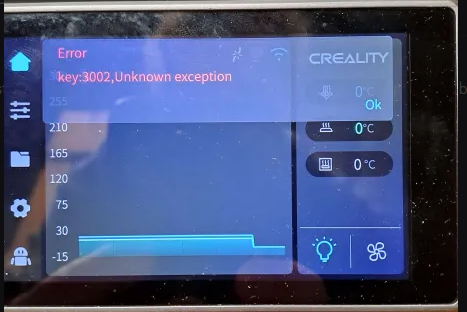
If you are factory resetting after installing Simple AF, there may be a 3002 error on the screen, this is completely normal.
If you are planning to install Simple AF again you can ignore it, if you are trying to go back to stock, power cycle the printer
again to clear the error.
First Start Setup
Note
This does not apply to retail Nebula Pad users
After performing a factory reset you might expect to be greeted with first time setup, but the Simple AF S58factoryreset suppresses this by modifying the
/usr/data/creality/userdata/config/system_config.json to skip self_test step!
You can force this manually by going to Settings, then Self-Check and selecting both Input Shaping and Auto Leveling.
It is recommended to do this step before installing Simple AF if the printer you are about to install Simple AF to is the only printer you have access to that can print probe mounts.
You can quickly Switch to Stock to print a mount if you damage your existing mount to the point you won't be able to home the printer or perform a bed mesh.