What is Simple AF?
I built Simple AF because I was tired of stitching together random pieces from helper scripts and Kiuah every time I set up a printer. I wanted one command that handled everything end‑to‑end, so I could take a K1 from a factory reset to fully calibrated in under 20 minutes.
Simple AF is basically the “everything just works” Klipper setup I always wished Creality shipped. It installs a clean, readable config, sets up a custom Klipper stack, and brings full modern probe support (Cartographer, Beacon, Eddy, EddyNG, BLTouch, Microprobe, Klicky) under one simple installer. It also runs leaner than the stock environment, freeing up system resources so your printer feels snappier and more responsive.
What is Klipper?
It seems that many people conflate Klipper with the entire ecosystem around klipper including a Screen UI (GrumpyScreen or KlipperScreen for instance), Moonraker, Fluidd / Mainsail and Klipper itself, which has Klippy the runtime component, but also the firmware that gets installed onto the MCUs themselves!
Here is an image I asked ChatGPT to generate which gives a basic overview of the architecture of a typical Klipper setup
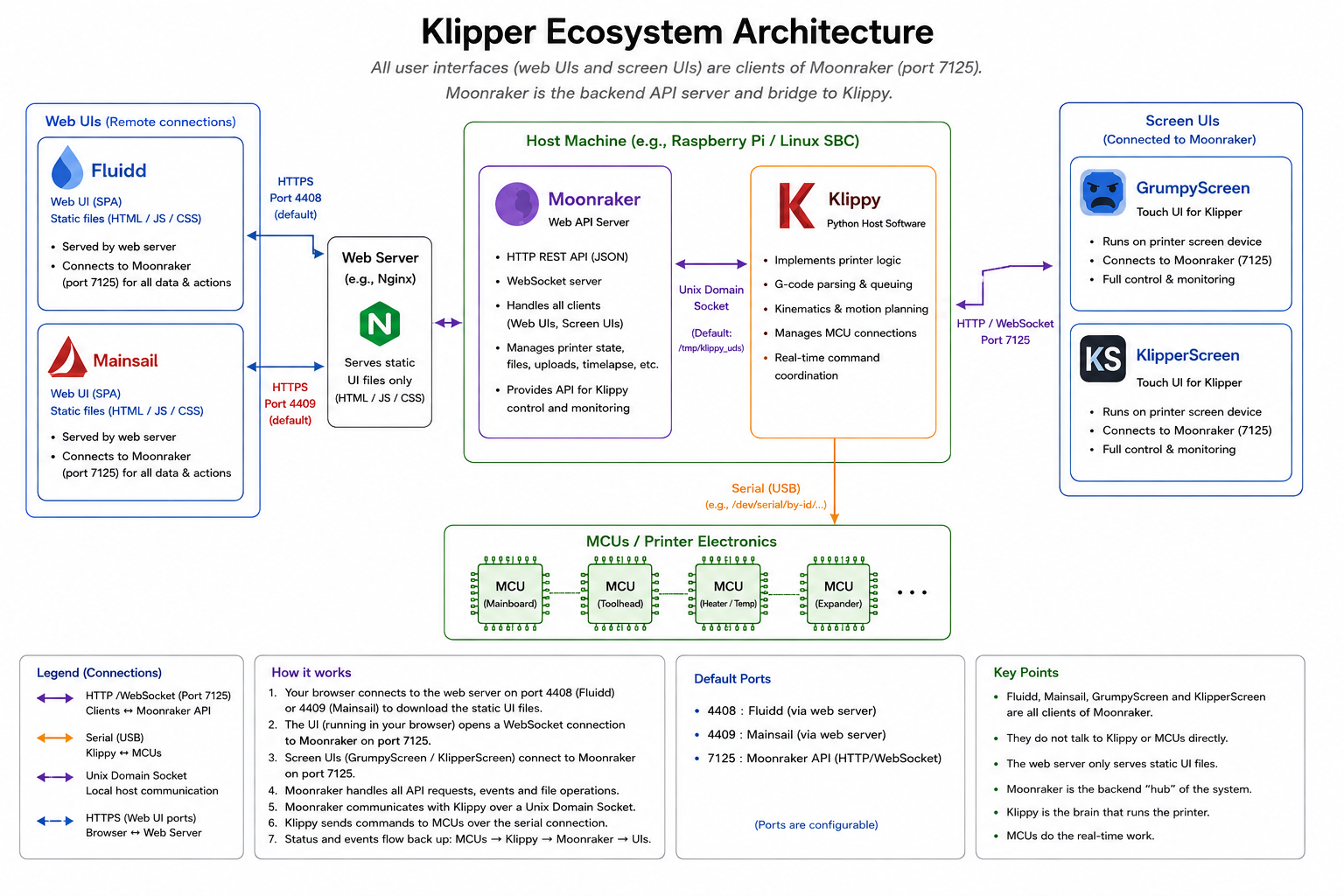
Things to note about the Host Machine and MCU:
- The Host Machine on a K1 is the mainboard, which also has the primary MCU
- For a Nebula Pad the host machine is the Nebula Pad, but the primary MCU is separate
- For a RPI, the Host Machine is the RPI, the primary MCU is separate
Note
I specifically excluded the WebCam from this diagram, but if it were added it would be a webcam connected via USB to the host, exposed via uStreamer or Crowsnest, and Nginx would serve the camera feeds. We add webcam configuration to moonraker and then Fluidd or Mainsail will show the camera feed in the UI
Philosophy
I am a huge proponent of Open Source, but not just open sourcing the code, but making sure it's possible to build and use the thing that the source is designed to provide. Creality has half-heartedly open sourced some of their stuff, mostly related to klipper, but without proper build files and correct and up-to-date documentation releasing the source is not helpful. A primary mission of Simple AF is everything is open, everything is configurable, everything is buildable, everything is documented. The macros we ship have lots of places you can modify their behaviour or extend their behaviour with custom hooks. Niche features are not always integrated, but custom hooks allow niche features to be used without having to replace lots of our gcode just to do that one thing.
When possible we use upstream projects without modifications, including:
- Moonraker
- Nginx
- Fluidd
- Mainsail
- Bash - Creality OS does not come with bash
- Dropbear sftp plugin - The Creality OS Dropbear ssh server does not support scp and sftp ootb
Note
We prebuild nginx, bash and drop bear sftp plugin but Fluidd, Mainsail and Moonraker are installed directly from upstream
When needed we maintain forks of upstream projects with additional features that are difficult to upstream, and we have done that for:
- Klipper - K1 Series - some quality-of-life features and precompiled c_helper.so / klipper_mcu
- Kalico - K1 Series - some quality-of-life features and precompiled c_helper.so / klipper_mcu
- Klipper Firmware - K1 Series - builds for firmware for Creality MCUs
- Kalico Firmware - K1 Series - builds for firmware for Creality MCUs
- uStreamer - optimised fps and support pause / resume of camera feed for cartographer, beacon and eddy without actually stopping the webcam service (K1 Series only)
- Klipper - RPI Series - some quality-of-life features
- Kalico - RPI Series - some quality-of-life features
Note
Even though we forked Kalico and Klipper the features we provide on top of vanilla Klipper and Kalico do not in any way change the core behaviour of either variant of Klipper, in many cases the stuff we have on top of Klipper is cherry-picked from Kalico or are small quality of life fixes to make working with Klipper easier, we are strongly apposed to the absolute cluster f*** that is Creality Klipper (fondly referred to as Crapper)

You are not locked into our forks of klipper, some people even use our macros with completely vanilla klipper / kalico and the only thing they need to manually copy over is the virtual pins and gcode shell command extras that we bundle.
We forked GuppyScreen to provide the GrumpyScreen UI because the GuppyScreen project was abandoned, and we wanted to continue to polish and improve the core functionality of GuppyScreen without all the niche features that make it hard to maintain. I called it GrumpyScreen as a nod to one of my heros Linus Torvalds who named Git after himself :-) This is to say, that I am a grumpy bastard and so GrumpyScreen got its name.
History
This project originally started back in early 2024 to provide a more open klipper ecosystem experience for K1 users, and the only way to do that was by using an alternative probe like a bltouch or microprobe because the prtouch load cells implementation was completely locked down and closed source. The situation has changed a bit recently of course but there are still many components of Creality OS that are closed source.
What is Creality OS?
Creality OS is based on buildroot and is used by K1, K1C, K1SE, K1M, Ender 3 V3, Ender 3 V3 KE, Ender 5 Max and the retail Nebula Pad.
Creality has never released the source for many components of their build root based Creality OS, and the web server, display server and camera stack are very visible components which are impossible for us to modify.
Even to this day there are parts of some klipper forks used by Creality OS which are not open source, or where there are no build files to build new firmware, we have spent a lot of time reverse engineering firmware blobs and bits of released source to produce new open source firmware and build config for all the printers we support.
What Printers are supported?
So Simple AF is supported on the following printers:
- Creality K1, K1C, K1SE and K1 Max (until the late 2025 models which changed the firmware entirely)
- Ender 5 Max
- Ender 3 V3
- Ender 3 V3 KE
- CR10SE
And now on a retail Nebula Pad with a limited set of older marlin creality printers including:
- Ender 3 V3 SE
- Ender 3 V1, V1 Pro, Neo, V2 and V2 Neo
What about Simple AF for RPI?
We also have a variant of Simple AF for users who have upgraded their Creality Printers to use a new mainboard with a SBC like a Rpi, I created this mostly at the behest of existing users who wanted the same basic ootb experience they had on their Creality stock hardware printers, so the RPI variant uses the same macros and installs the same basic software with a few obvious differences including:
- Crowsnest instead of UStreamer
- Our Klipper and Kalico forks don't precompile c_helper.so or the Klipper mcu binaries
For RPI series the process to calibrate a printer is basically the same, the main difference is as part of the installer you choose a base printer cfg, either one we maintain or you can provide your own, but then the installation process is the same.
Note
I am well aware of kiauh and people are probably asking why not just use kiuah, my personal preference is I actually don't like kiuah at all because I want to run a single command and get everything setup, I don't want to have to go searching through menus for each feature I want to install, and I want the entire installation to be tightly integrated and tested together.
But the main reason Simple AF for RPI exists is because existing users on stock hardware asked for it and I ended up migrating my RPI based printers too because I find the experience much more streamlined and simple to use as a result.
What Probes are supported?
It supports automatically configuring one of the following probes for one of the above printers:
- BLTouch, CRTouch (3dTouch can be supported but there is so much variability)
- BTT BIQU Microprobe
- Cartographer V3 and V4
- Beacon
- BTT BIQO USB Eddy or DUO in USB mode
- EddyNG on a BTT BIQU USB Eddy or DUO in USB mode
- Klicky Probe
- Load Cells built into the bed (experimental)
We support a variety of mount options across many of those printers and lots of documentation for how to set them up.
What gets installed?
Running the installer sets up:
- Klipper or Kalico
- Moonraker
- Nginx
- Fluidd and Mainsail (with an easy way to switch which is the default but both are available on different ports)
- A webcam stack
- A backup tool including integration with GitHub to backup your customisations
- A full set of macros so you can calibrate and start printing immediately no having to hunt for anything
- The ability to switch probes without a reinstallation
- The ability to easily switch to stock if you need to reprint a mount (K1 Series only not supported for retail Nebula Pad)
What about support?
We have a discord and a wiki with lots of information, including a FAQ and specific pages for many features, where definiciencies in docs are identified, we always try our best to get that rectified, no one likes discord search!
Because Simple AF is essentially the same across all printers we support, there are 1000s of people using Simple AF on various printers with various probes but their experience can benefit new users even if they are not on the exact same platform or probe.
We have an excellent relationship with the Cartographer3D team and we offer first line support for Cartographer on SimpleAF but some of the support people on the SimpleAF discord serve that function on cartographer discord too.