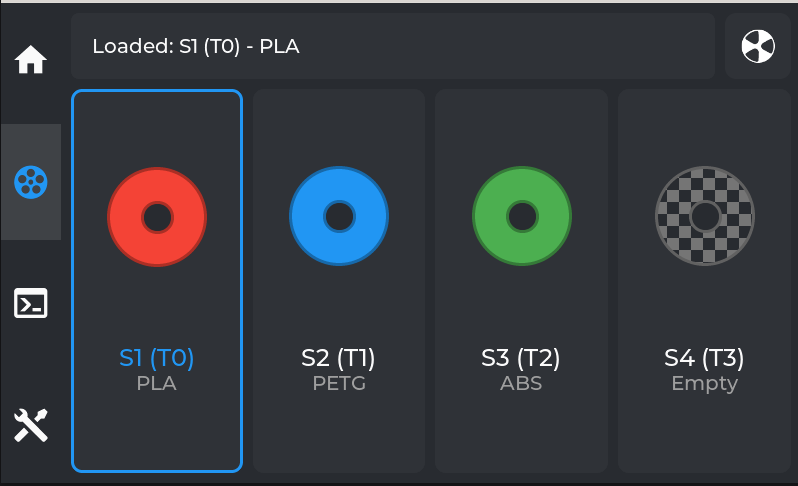
Multimaterial Support
Simple AF is adding full MMU support for either AFC or Happy Hare, initially this support is documenting how to install AFC and Happy Hare and enable MMU panels in grumpyscreen, in the future we will be adding custom hooks for filament cutters and the like to make integrating a MMU much easier.
Note
A community member is working on porting CFS to work with AFC, so far the results are looking promising, we will update the wiki if we get to a point where we are comfortable to release the code!
Install AFC
For more information head to https://github.com/AFCProject/AFC-Klipper-Add-On
Note
For Simple AF for RPI follow the AFC official guide instead.
First of all clone the repo, you must clone it to /usr/data, do NOT clone it to /root:
pip install crudini
git clone https://github.com/AFCProject/AFC-Klipper-Add-On.git  /usr/data/AFC-Klipper-Add-On
ln -s /usr/data/AFC-Klipper-Add-On /root
cd /root/AFC-Klipper-Add-On
./install-afc.sh -k /usr/data/klipper -m /usr/data/printer_data/config/moonraker.conf -y /usr/share/klippy-env/bin -p /usr/data/printer_data/config
Warning
The above approach will hopefully be greatly simplified soon as a few fixes have been made to the Creality OS support on the AFC repository but not released.
Install Happy Hare
For more information head to https://github.com/moggieuk/Happy-Hare
Note
For Simple AF for RPI follow the Happy Hare official guide instead.
The default installer needs to be executed with some different arguments
So first of all clone the repo:
Then run the installer:
cd /usr/data/Happy-Hare
./install.sh -k /usr/data/klipper -c /usr/data/printer_data/config -z -m /usr/data/moonraker -e
systemctl restart moonraker
systemctl restart klipper
Enable MMU in Grumpyscreen
To access the MMU panel in grumpyscreen you must modify the grumpyscreen.ini to enable your chosen backend:

Restart Grumpyscreen after making this change
Tip
You can restart Grumpyscreen via the Services menu in Fluidd or Mainsail, you can also Restart GUI from Grumpyscreen
When you restart Grumpyscreen there will be a MMU icon on the left panel, it will be grayed out until klipper starts and Grumpyscreen sees the required MMU configuration registered.