Chamber Temperature
Wait for Chamber Temp
Orca Slicer has the ability to define a chamber target temp per filament and if you want Simple AF to wait on that chamber temp before actually trying to print we can with a bit of work in both Orca Slicer and Simple AF via Custom hooks.
OrcaSlicer 2.3.2 Changes
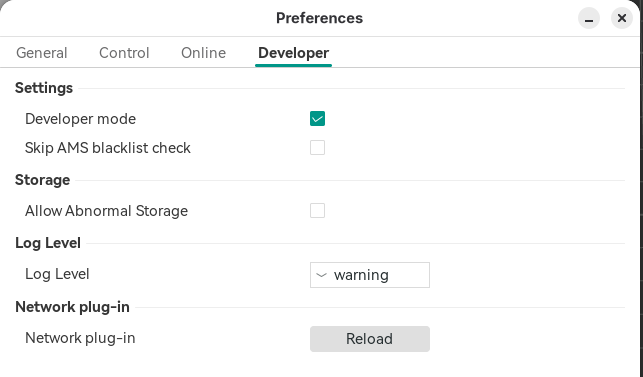
Starting from OrcaSlicer 2.3.2 for some strange reason, you have to enable developer mode to access these settings:
And then you have to enable the setting in the Printer Settings (Basic information) settings:

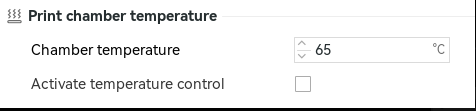
Step 1 - Define per filament any requirement for a chamber temp, look Print chamber temperature for:
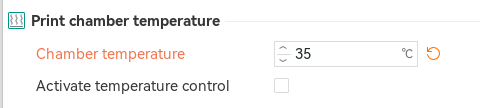
Set a value in celcius, but do NOT check the Activate temperature control checkbox.
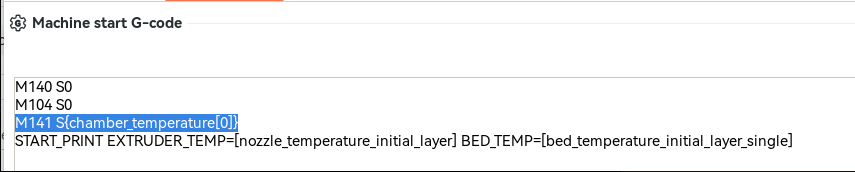
Step 2 - Add CHAMBER_TEMP={chamber_temperature[0]} to Machine Gcode Start Print:

Step 3 - Define a _SAF_START_PRINT_BEFORE_LINE_PURGE custom hook, something like this would work:
[gcode_macro _SAF_START_PRINT_BEFORE_LINE_PURGE]
gcode:
    {% set CHAMBER_TEMP=params.CHAMBER_TEMP|default(0)|float %}
    {% if CHAMBER_TEMP > 0 %}
        RESPOND TYPE=command MSG="Waiting chamber to reach {CHAMBER_TEMP}c ..."
        TEMPERATURE_WAIT SENSOR="temperature_sensor chamber_temp" MINIMUM={CHAMBER_TEMP}
        RESPOND TYPE=command MSG="Chamber target temperature reached: {CHAMBER_TEMP}°C"
    {% endif %}
Chamber Fan Target Temp
There is no way to pass in a parameter to start print for this, but there is a really easy workaround and you can even set the target per filament. The target being the temp at which the fan gets activated.
So per filament in Orca Slicer find the Print chamber temperature and set a value in celcius, but do NOT check the Activate temperature control checkbox.
Then in your Machine start Gcode above START_PRINT add this line (before the START_PRINT line):
The M141 macro provided by Simple AF (derived from Helper Script) sets the target of the chamber fan via this macro.