Filament Runout
Simple AF comes with filament runout detection out of the box for all printers which are fitted with a filament runout sensor
Configuration
It is vital you define a filament_switch_sensor filament_sensor with the following configuration:
[filament_switch_sensor filament_sensor]
switch_pin: <<CHANGE ME>>
pause_on_runout: false
runout_gcode: _ON_FILAMENT_RUNOUT
The switch_pin will differ depending on your printer, on a K series printer such as a K1, by default it will be !PC15, if you switch to a
nozzle based filament runout sensor it will be !nozzle_mcu:PA10, for RPI based printers it will vary.
Danger
Do not set pause_on_runout to True, Simple AF relies on pause_on_runout being false to prevent ghost triggering of resume and pause
during filament change, the printer will be paused as part of calling _ON_FILAMENT_RUNOUT!
Testing filament runout works
You can very easily verify that the filament runout sensor is working correctly by using the gcode QUERY_FILAMENT_SENSOR SENSOR=filament_sensor,
where no filament is inserted it should report:
Where filament is detected it should report:

How can I switch to a toolhead filament runout sensor?
So if you are using the DXC extruder, Creality CFS Extruder, or even the Henlor Mod for the stock Extruder, you want to switch from using the runout sensor bolted to the printer case and use the extruder runout sensor on the toolhead, its really easy, its literally just a single config change in your printer.cfg.
So find the [filament_switch_sensor filament_sensor] and change:
From: switch_pin: !PC15
To: switch_pin: !nozzle_mcu:PA10
It should look something like this (there may be event_delay and pause_delay which should be left alone):
[filament_switch_sensor filament_sensor]
pause_on_runout: false
switch_pin: !nozzle_mcu:PA10
runout_gcode: _ON_FILAMENT_RUNOUT
Save and Restart and enjoy!
Danger
Do not define two filament_switch_sensor that both _ON_FILAMENT_RUNOUT for runout_gcode, the installer will
remove the [filament_switch_sensor filament_sensor_2], do not restore this config!
Please also note that on more recent versions of Simple AF the pause_on_runout value is set to false, because
we trigger PAUSE from the _ON_FILAMENT_RUNOUT macro now to avoid phantom triggers of pause when changing filament!
How can I prevent a print starting or resuming if there is no filament present?
Open the start_end.cfg, find the variable_runout_sensor in the _CLIENT_VARIABLE section and set it to match
your filament runout sensor, like so:
Warn
The runout sensor you specify in the variable_runout_sensor configuration must match exactly your configuration,
so for instance if you switch to a toolhead sensor you might have configured it as [filament_switch_sensor toolhead_sensor]
in which case you must change the configuration to variable_runout_sensor: "filament_switch_sensor toolhead_sensor"
Save and Restart
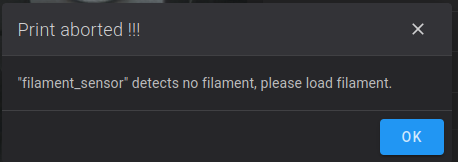
Then when you try to start a print without filament you will get a message like:
Troubleshooting
Why is my print not pausing on filament runout?
If you have confirmed Testing filamment runout works outside of printing, then it's time to see if pause failed for other reasons. Quite often its due to misconfiguration and you will usually get an error in the gcode console of either Fluidd or Mainsail.
Common reasons might include:
- An error in a
_SAF_ON_FILAMENT_RUNOUTcustom hook - An out of bounds error in the park coordinates (variable_park_at_cancel_x and variable_park_at_cancel_y)
So the first place to look is always going to be the gcode console
Why is my print not aborting when filament is missing?
This is a separate issue, by default prints will not be aborted if filament is missing, but you can enable this, please see above