Flashing Creality firmware via mcu_util.py
Bricking Risk
This is always a risk of bricking an MCU using this method, we do not accept any responsibility for a bricked MCU if you decide to try this, all care and no responsibility!
Note
This feature does not apply if you are using a Ender 3 V3 SE or an older Ender 3 on a retail Nebula Pad, because the printer is flashed with standard klipper firmware via the Marlin bootloader.
Once Simple AF has been installed and the machine restarted at least once, the firmware now has a bootloader which allows you to flash new firmware without a restart.
The basic steps are:
- Stop klipper
- Enter bootloader of an MCU
- Flash firmware to MCU
- Start firmware on MCU
- Start Klipper
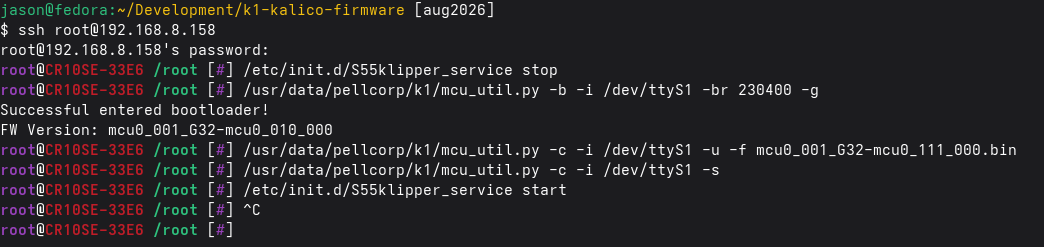
The steps to flash the MCU on most Creality printers that have one looks like:
/etc/init.d/S55klipper_service stop
/usr/data/pellcorp/k1/mcu_util.py -b -i /dev/ttyS1 -br 230400 -g
/usr/data/pellcorp/k1/mcu_util.py -c -i /dev/ttyS1 -u -f mcu0_001_G32-mcu0_111_000.bin
/usr/data/pellcorp/k1/mcu_util.py -c -i /dev/ttyS1 -s
/etc/init.d/S55klipper_service start
Danger
Please remember if you flash new firmware via this method on a Creality OS printer, the existing
/etc/init.d/S13mcu_update mechanism will flash your mcu back to its older firmware next time
the printer is restarted. This happens automatically the only way to defeat it is to either
remove the /etc/init.d/S13mcu_update or the specific /usr/data/klipper/fw bin file you are updating.
Removing S13mcu_update is strongly discouraged because you will end up having significant issues next time
we ship new firmware or a new version of klipper.
SimpleAF for RPI or PIK1
If you flash Simple AF firmware onto your MCUs via the /etc/init.d/S13mcu_update before you
switch over to RPI or PIK1, you can then use the mcu_util.py to flash them in future from your pi.
The Serial Devices
You will need to check your printer.cfg for the specific /dev/ttyS? of your target MCU, for a K1 series printer they are:
- nozzle_mcu -> /dev/ttyS1
- mcu -> /dev/ttyS7
- leveling_mcu -> /dev/ttyS9
For an Ender 3 V3 KE the mcu is:
- mcu -> /dev/ttyS1
For an CR10SE:
- mcu -> /dev/ttyS1
- nozzle_mcu -> /dev/ttyS7
How do I build new firmware?
We have a fork of kalico for building firmware for Creality mainboads such as the K1 series, Ender 3 V3 KE, CR10SE, Ender 3 V3 and Ender 5 Max.
Check the readme for basic instructions on what to build.