Alternative EddyNG Flashing
On Printer after installation
You need to hold down the boot button and re-connect your btt eddy to your printer verify that the btt eddy has been mounted as a disk drive on the printer by running ls /tmp/udisk/sda1/, you should see:

Once this has happened you will be able to copy the btteddy.uf2 file to the eddy via this command:
If you check ls /tmp/udisk/sda1 again, it should have disappeared
You might need to fix up the serial at this stage which you can do easily:
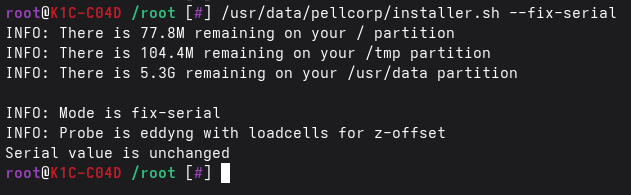
If you see INFO: Restarting Kalico you can go back to Fluidd or Mainsail and wait for Kalico to restart,
if however it says: Serial value is unchanged you will need to force Kalico to restart yourself with:
Note
Running the restart command will produce no output, but if you check Fluidd / Mainsail it should show
Kalico is restarting. Also please note even though it says S55klipper_service it is restarting Kalico!
On Printer before Install
You can flash the eddy on your printer (K1, K1C, K1SE, K1M, Ender 3 V3 KE, etc) but you need to be able to disconnect and reconnect it for this to work, there is currently no way to get the eddy into boot mode any other way!
You need to hold down the boot button and re-connect your btt eddy to your printer verify that the btt eddy has been mounted as a disk drive on the printer by running ls /tmp/udisk/sda1, you should see:
Once this has happened you will be able to copy the btteddy.uf2 file to the eddy via this command:
wget --no-check-certificate https://raw.githubusercontent.com/pellcorp/kalico/aug2026/fw/K1/btteddy.uf2 -O /tmp/btteddy.uf2
cp /tmp/btteddy.uf2 /tmp/udisk/sda1/
If you check ls /tmp/udisk/sda1 again, it should have disappeared
Flashing on Windows or Linux Desktop
Connecting in BOOTSEL mode
You need to connect your btt eddy to your computer in BOOTSEL mode, you do this by disconnecting the eddy usb or eddy duo, and then push and hold boot button on Eddy (It's next to where the cable plugs in) and at the same time, plug in the cable to your computer.
On windows or a Linux Desktop if you successfully connected the eddy in bootsel mode, it will be mounted as a new drive on your computer.
Flashing btteddy.uf2 file
Copy the btteddy.uf2 file across to the btt eddy drive, it should automatically flash the eddy and disconnect for you.
Once this is done go ahead and reconnect your eddy to your printer.
How do I know it flashed correctly?
Unfortunately we know of no way to test this except by plugging it back into the printer, restarting klipper and verifying via the System tab, a correctly flashed eddy will have